5-Minute Guide: Set Up Your Branded Mobazha Store
By Mobazha Team
You’ve created your Mobazha store. Now let’s make it yours — with a branded URL, your own Telegram Bot, and shareable links that look professional.
This takes about 5 minutes.
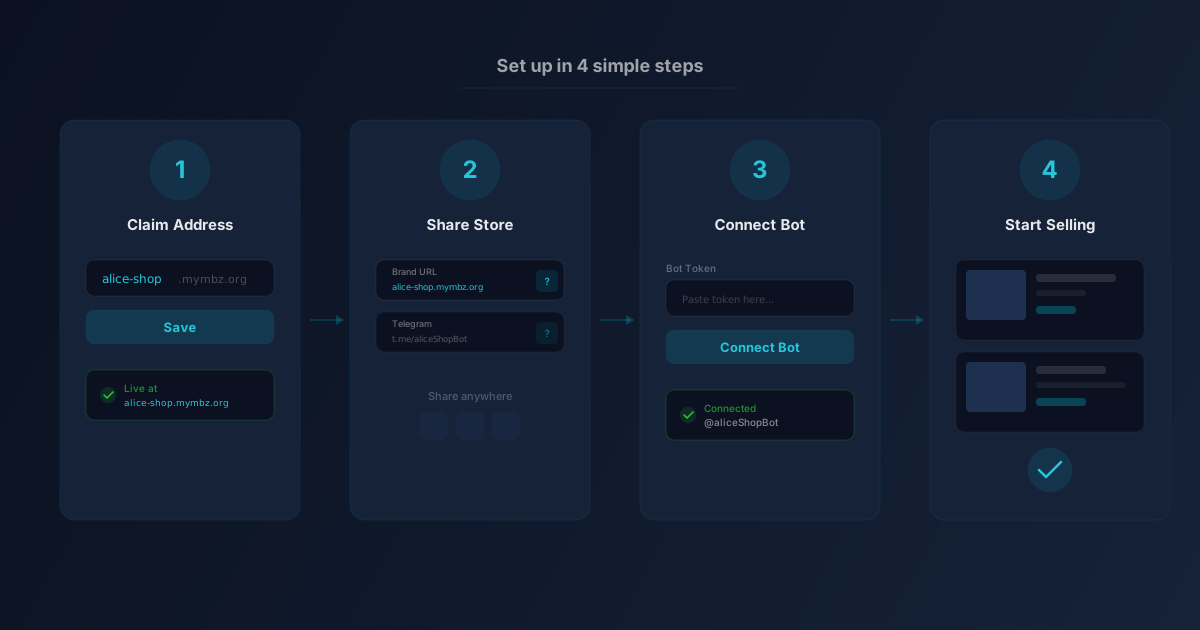
Step 1: Claim your branded address
- Log in to your store at app.mobazha.org
- Go to Admin → Settings → Sales Channels
- In the “Store Address” section, type the name you want (e.g.
alice-shop) - Click Save
Your store is now live at alice-shop.mymbz.org. Customers can browse your products, check out, and track orders — all under your brand.
Naming tips: Use lowercase letters, numbers, and hyphens. Keep it short and memorable. You can change it later, but old links will stop working.
Step 2: Share your store
Once your branded address is set, go to the Share section on the same page. You’ll see your branded link front and center:
- Your branded URL —
https://alice-shop.mymbz.org— copy and share anywhere - Telegram link — opens your store inside Telegram as a Mini App
- Platform link — a fallback link that always works, even if you change your address later
Copy your branded URL and paste it in your social media bio, email signature, or wherever your customers find you.
Step 3: Connect your Telegram Bot (optional)
Want customers to interact with your bot instead of the Mobazha marketplace bot? Here’s how:
- Open Telegram and search for @BotFather
- Send
/newbotand follow the prompts to create your bot - BotFather will give you a token — copy it
- Back in Admin → Settings → Sales Channels, scroll to the “Telegram Bot” section
- Paste the token and click Connect
That’s it. Your bot is now linked to your store. When customers open your bot in Telegram, they see your products and can buy directly.
Important: Before connecting a bot, make sure you’ve linked your Telegram account in Settings → Account. This lets the system recognize you as the store owner when you open your own bot.
Step 4: Add products and start selling
If you haven’t already, add some products:
- Go to Admin → Products → Add Product
- Fill in the title, description, price, and upload photos
- Set your accepted payment methods (crypto, Stripe, PayPal — or all of them)
- Click Publish
Your products are immediately visible on your branded storefront and in the Mobazha marketplace.
What customers see
When someone visits your branded URL, they see:
- Your store name and logo in the header
- A hero section with your store description
- Your product catalog with search and filtering
- A smooth checkout flow with buyer protection on every crypto transaction
No Mobazha branding in the way. It’s your store.
Going further: Self-host your store
If you want complete control — your own server, your own domain, your data never leaving your hardware — you can deploy a standalone Mobazha store with one command:
curl -sSL https://get.mobazha.org/standalone | sudo bashAdd --domain shop.yourdomain.com for automatic TLS. See our Self-Host page for the full guide.
The best part: SaaS and self-hosted stores run the same software. You can start on SaaS today and migrate to self-hosted later — or use both.
Need help? Join our Telegram community or ask on Discord.